

Janken - Twitch Chat Game
Introduction
Description
The Janken chat game is a rock-paper-scissors game that your chat viewers can play either via command or through channel point rewards.
Once the challenge is launched and accepted, players must choose a game mode to define the number of points needed to win the match. The game comes pre-configured with 3 modes:
- Sudden Death (first to win one point wins)
- Best of 3 (first player to 3 points wins)
- Best of 5 (first player to 5 points wins)
Once the game has started, players must send a Twitch whisper to the broadcaster's bot account with their choice for that round (rock, paper or scissors).
During the game, the bot will send messages in the stream chat to notify everyone of the game's progress, winners and scores.
At the end of the game, points are awarded to each player. If an achievement has been unlocked, the player will also be notified directly in the Twitch chat.
Planned Updates
- Game interface for overlay
- Viewer leaderboard
- Graphical design improvements
Installation and Configuration
Prerequisites
To install this game on your stream, you need the following tools:
- Streamer.bot v1.0 or higher
- OBS Studio
- A Twitch bot account
Import the actions into Streamer.bot.
!janken(if you want to trigger games with the command, otherwise use only the channel point reward)!jankenAchievementsto receive the list of unlocked achievements in chatresetJankento reset the game
Start the WebSocket server
- Servers > WebSocket Server > Start
SendMessage() request which requires authentication to work! If you don't want to authenticate, the widget will use the Send Achievements action as a fallback.Connect your bot account to Streamer.bot
The bot account is used to receive messages outside of Twitch chat, to prevent players from knowing what the other player has sent. It is also used to send notification messages throughout the game.
Create a new Twitch channel point reward (optional)
If you want your viewers to trigger a new game with channel point rewards.
- Create your new reward with the parameters you want.
- Click on the
1.0 Setup - Initiate Gameaction - Double-click on the
Reward Redemptiontrigger and choose your new reward.
Open the configuration interface
- Open the
janken-achievements-editor.htmlfile in your browser. - Click on "Load File".
- Navigate to the JSON file included in the widget folder and select it.
Fill in your WebSocket connection information
- Click on the Settings tab.
- In WebSocket settings, enter your WebSocket connection information.
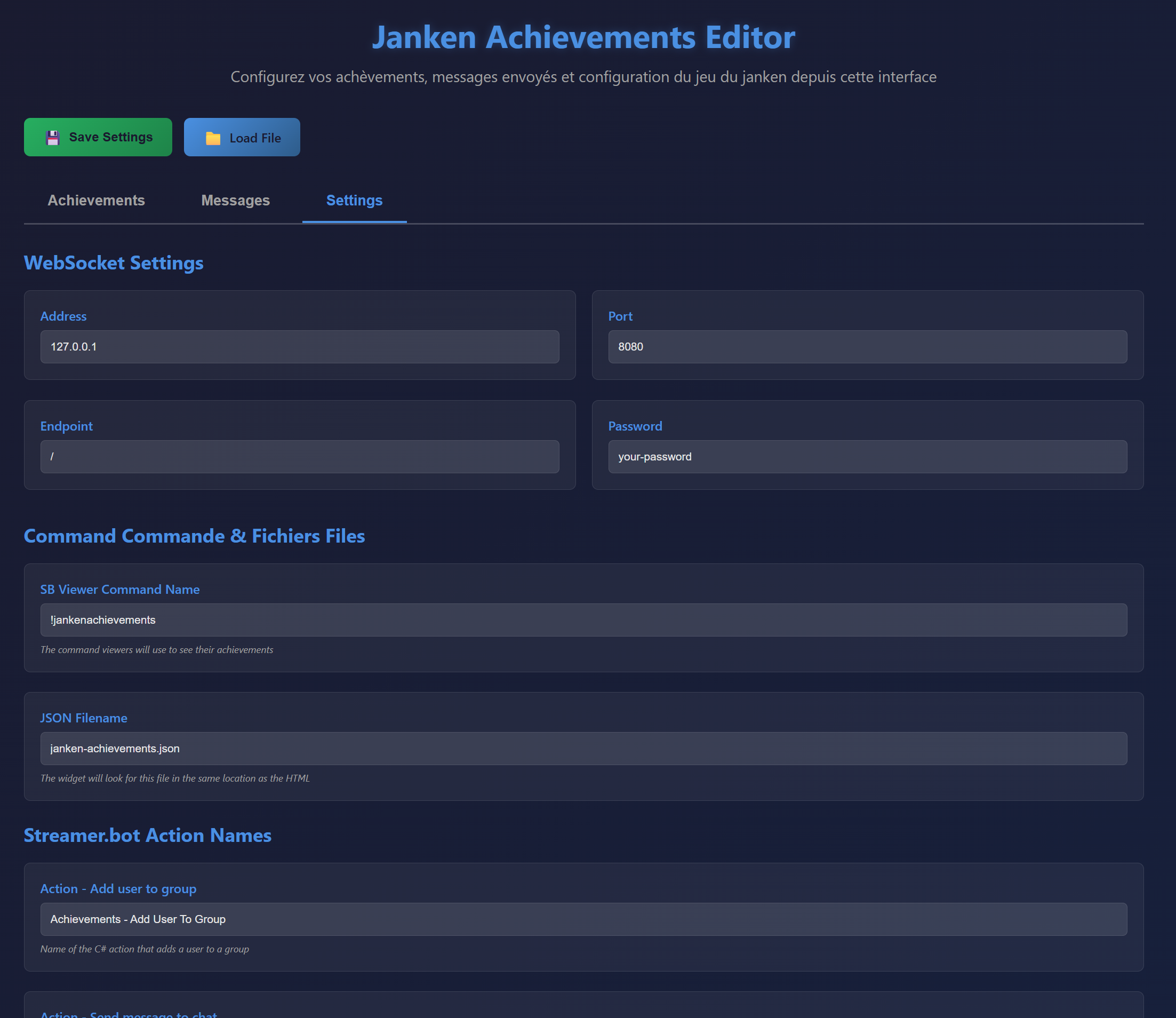
Customise the achievements
- Click on the Achievements tab
- Modify the achievement texts
- Add/Remove rows as you wish.
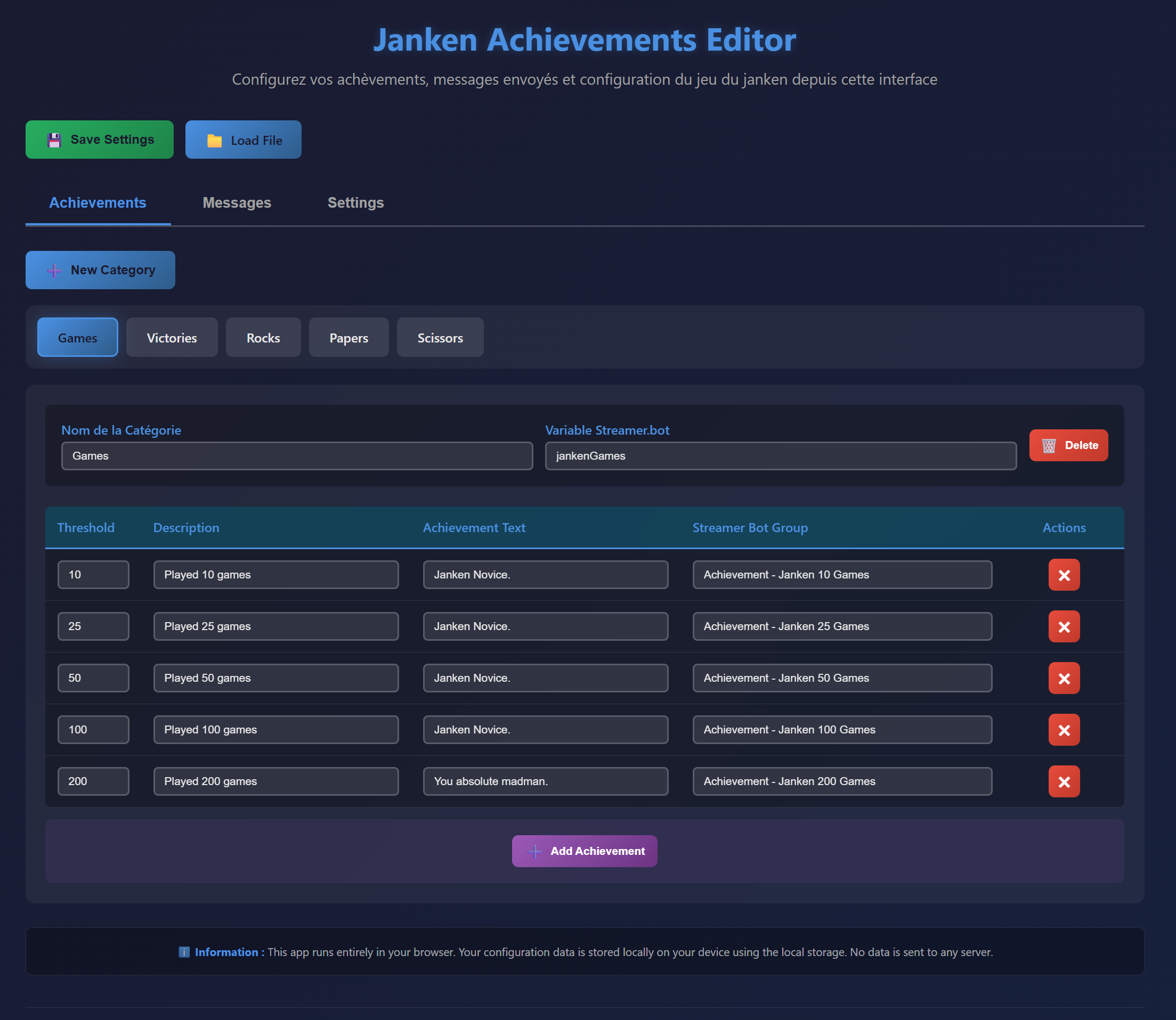
Customise the messages
Achievement messages
- Click on the Messages tab
- Edit the value of messages sent by the widget. Available variables are listed for each field.
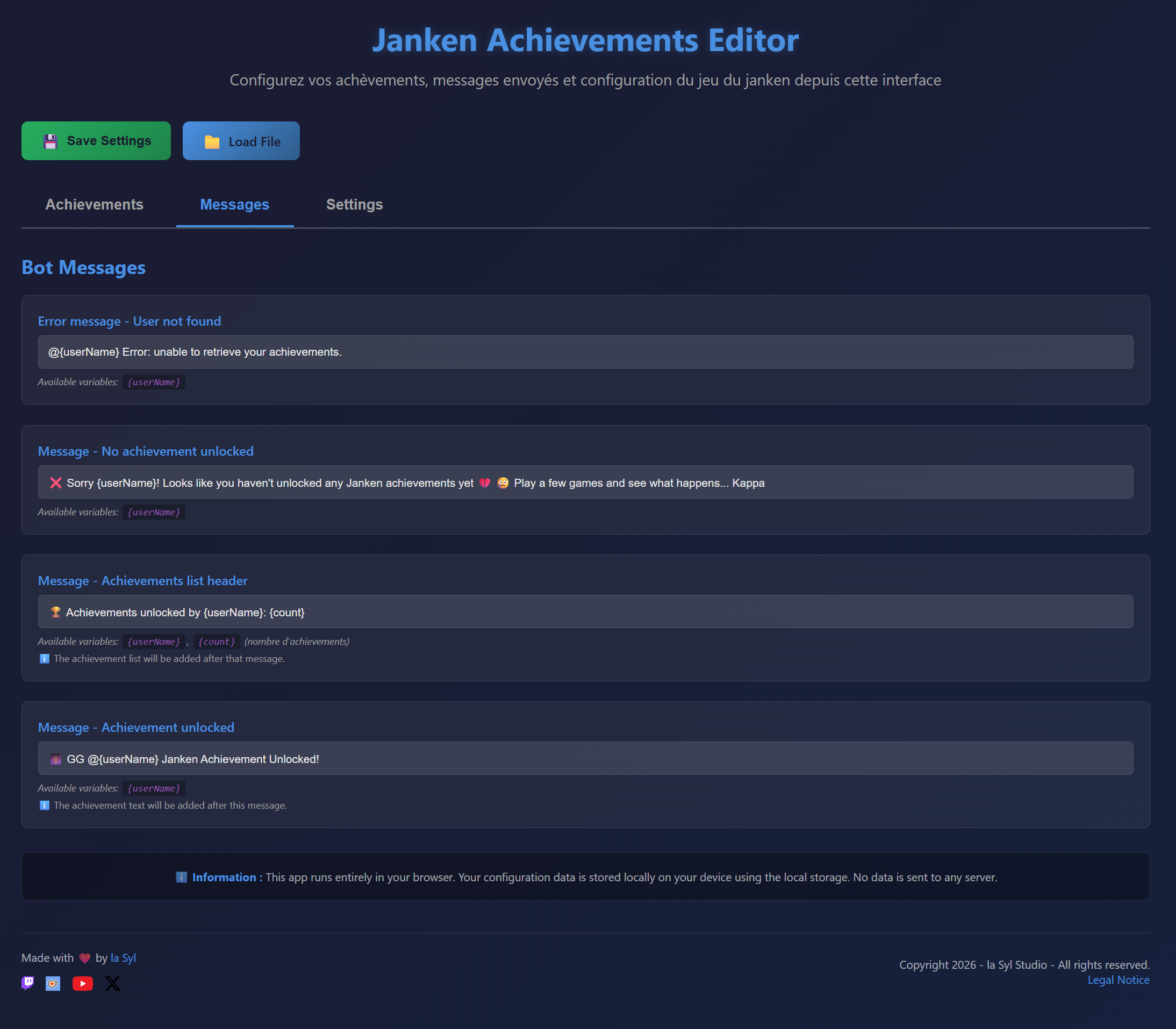
Game messages
Game messages are customisable in the Streamer.bot actions. Each action has Set Bot Messages folders that include the arguments used in the action for messages. Open the actions one after another and edit the arguments in these folders.
Save your new configuration
- Click "Save" at the top of the page.
- Overwrite the old configuration file with yours.
Add a new browser source to OBS
- Add a new browser source to OBS.
- Enter the path to the
janken-achievements-widget.htmlfile with the absolute protocol like this:http://absolute/C:/your/path/to/janken-achievements-widget.html - Dimensions don't matter: this source is not visible, it acts as a backend.
- Make sure the source remains active throughout your stream or it won't be able to communicate with Streamer.bot.
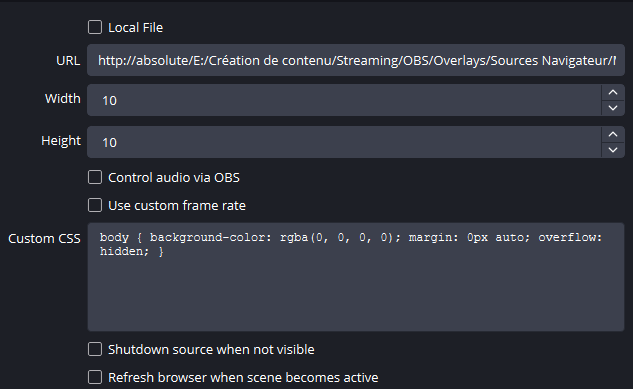
absolute protocol, there will be errors!That's it. You can test a new game to confirm that everything works as expected.
Available Commands & Controls
All game controls are done via commands sent in Twitch chat except for the rock, paper and scissors commands which are sent via private message to the bot account connected in Streamer.bot. You can see here the complete list of configured commands.
These commands are accessible at specific moments when launching a game.
| Command | Description | Availability |
|---|---|---|
!janken [username] | Challenge a viewer to Janken (optional) | Between games |
!acceptJanken | The challenged player accepts the Janken game | After a viewer has started a game |
!refuseJanken | The challenged player refuses the Janken game | After a viewer has started a game |
!mode | Mode choice for the game by player 1 or 2 | After a player has accepted a Janken game |
These commands are only available during an active game.
| Command | Description |
|---|---|
rock paper scissors | Player's choice for the current round. |
!rageQuit | Player abandons the game |
These commands are accessible at any time, during and between games.
| Command | Description |
|---|---|
!jankenAchievements | Get the list of unlocked achievements |
!resetJanken | End a game in progress (only accessible to broadcasters and moderators) |
Integrated Scoring and Achievement System
The game includes a customisable scoring and achievement system via the interface provided in the widget. You will find here the information for the default configuration.
Player Scores
Throughout the game, scores are recorded for viewers in user global variables. The following points are tracked:
- Number of games
- Number of victories
- Number of lost games
- Number of abandoned games
- Number of uses of rock / paper / scissors
Unlockable Achievements
The game is pre-configured with 20 unlockable achievements for viewers based on points accumulated during games. Achievements are of course customisable, you can add and modify whatever you want!
| Achievement | Message | Group | Variable | Condition |
|---|---|---|---|---|
| Played 10 games | Janken Novice. | Achievement - Janken 10 Games | jankenGames | When jankenGames equals 10 |
| Played 25 games | Janken Regular. | Achievement - Janken 25 Games | jankenGames | When jankenGames equals 25 |
| Played 50 games | Janken Pro Player. | Achievement - Janken 50 Games | jankenGames | When jankenGames equals 50 |
| Played 100 games | Janken Addict. | Achievement - Janken 100 Games | jankenGames | When jankenGames equals 100 |
| Achievement | Message | Group | Variable | Condition |
|---|---|---|---|---|
| Won 10 games | Rising Champion. | Achievement - Janken 10 Victories | jankenVictories | When jankenVictories equals 10 |
| Won 25 games | Confirmed Champion. | Achievement - Janken 25 Victories | jankenVictories | When jankenVictories equals 25 |
| Won 50 games | Janken Master. | Achievement - Janken 50 Victories | jankenVictories | When jankenVictories equals 50 |
| Won 100 games | Janken Legend. | Achievement - Janken 100 Victories | jankenVictories | When jankenVictories equals 100 |
| Achievement | Message | Group | Variable | Condition |
|---|---|---|---|---|
| Played rock 10 times | Rolling Stone. | Achievement - Janken Pierre 10 Times | pierreCount | When pierreCount equals 10 |
| Played rock 25 times | Rock Master. | Achievement - Janken Pierre 25 Times | pierreCount | When pierreCount equals 25 |
| Played rock 50 times | Stone Mountain. | Achievement - Janken Pierre 50 Times | pierreCount | When pierreCount equals 50 |
| Played rock 100 times | The Rock. | Achievement - Janken Pierre 100 Times | pierreCount | When pierreCount equals 100 |
| Achievement | Message | Group | Variable | Condition |
|---|---|---|---|---|
| Played paper 10 times | Apprentice Gardener. | Achievement - Janken Feuille 10 Times | feuilleCount | When feuilleCount equals 10 |
| Played paper 25 times | Confirmed Gardener. | Achievement - Janken Feuille 25 Times | feuilleCount | When feuilleCount equals 25 |
| Played paper 50 times | Walking Forest. | Achievement - Janken Feuille 50 Times | feuilleCount | When feuilleCount equals 50 |
| Played paper 100 times | Janken's Green Lung. | Achievement - Janken Feuille 100 Times | feuilleCount | When feuilleCount equals 100 |
| Achievement | Message | Group | Variable | Condition |
|---|---|---|---|---|
| Played scissors 10 times | Apprentice Hairdresser. | Achievement - Janken Ciseaux 10 Times | ciseauxCount | When ciseauxCount equals 10 |
| Played scissors 25 times | Expert Hairdresser. | Achievement - Janken Ciseaux 25 Times | ciseauxCount | When ciseauxCount equals 25 |
| Played scissors 50 times | Hair Salon. | Achievement - Janken Ciseaux 50 Times | ciseauxCount | When ciseauxCount equals 50 |
| Played scissors 100 times | Golden Scissors. | Achievement - Janken Ciseaux 100 Times | ciseauxCount | When ciseauxCount equals 100 |
Troubleshooting
The widget won't connect
- Check that the WebSocket server is started
- If you're using authentication, confirm that your password is correct in the editor, and that you've saved your configuration.
- Confirm that the .json file is present in the folder and that its name matches the one in the editor.
- Check that the URL was entered correctly in the OBS browser source preceded by
http://absolute/.
Achievements aren't unlocking
- Check that the OBS source is active during your stream.
- Confirm that the configured variables are correct in the editor and that you've saved your configuration.